Attributes
Attributes are the most powerful idea in MetaRoad. One uniform mechanism lets a plain lane carry any data or
generate any geometry along its length: the same lane can become a marked highway, a guardrail run, a lofted bridge, a
landscape-shaping cut, or a carrier of your own custom data. Everything is a typed curve of keys sampled along the
lane by arc-length (SOffset), and new attribute types plug in with no changes to the core plugin.
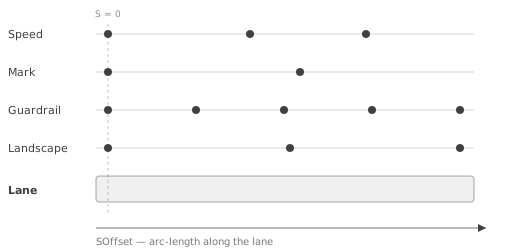
One lane can carry many attributes at once — each is an independent track of keys placed along the lane’s SOffset
(arc-length) axis, and the first key of each sits at S = 0.
You place and edit attributes in the editor with the Attribute sub-mode.
What attributes let you do
Each capability below is produced by a built-in attribute type — at bake time, or live for Landscape:
Paint lane markings — the Road Mark attribute generates center lines, edge lines, dashes, and custom strips.
Line the road with meshes and props — Spline Mesh sweeps a mesh (guardrails, barriers, curbs) while Component and Actor templates repeat props (lamp posts, cones, power lines) along the lane.
Build bridges, tunnels and walls — Lofting (Pro) extrudes a 2D cross-section into a continuous surface that follows the road.
Shape sidewalks and drop curbs — Sidewalk Height ramps the walkway and Curb Cut (Pro) lowers the curb at crossings and driveways.
Drop surface overlays — the Polygon (Pro) attribute places stop lines, arrows, and hatching.
Shape the terrain — the Landscape (Pro) attribute deforms the Unreal landscape along the road.
Carry your own data — Speed (and any custom struct) stores values along the lane that you can read at runtime to drive your own systems.
How an attribute works
An attribute is attached to a lane (or the section center-line). It has a unique type (e.g.
Speed,Mark,Fence) and holds a sorted list of keys.Each Attribute Key pairs an
SOffset(arc-length position along the lane;0= the lane’s start) with Attribute Data — an arbitrary C++ or Blueprint structure (a speed value, a mark profile, a cross-section, …). The first key is fixed atSOffset = 0.Evaluation is either stepped or interpolated, depending on the value type:
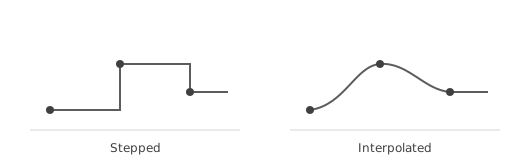
Stepped attributes hold the last key’s value until the next key (speed limits, road marks); interpolated attributes blend smoothly between keys (landscape height, curve transforms).
Attributes are stored per lane and per section center-line, keyed by attribute type, so one lane can carry many different attributes at once.
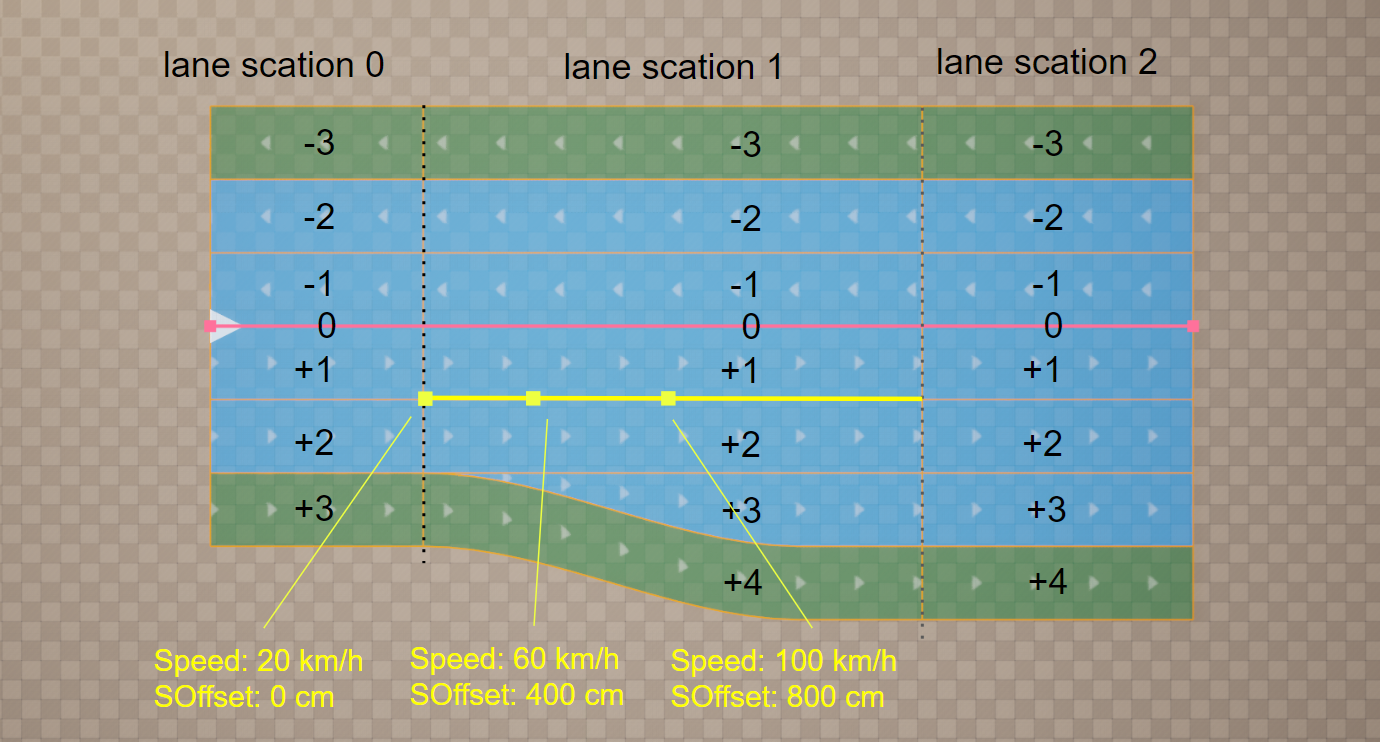
For example, the Speed attribute below is set on a single lane (ID +1 in section 1) with three keys at SOffset
0 cm, 400 cm and 800 cm. Each key’s Attribute Data is a single float, giving 20, 60 and 100 km/h along the lane:
Data or geometry
An attribute produces one of two things along the lane:
Data — a value sampled at every position (Speed, or your own struct). Nothing is generated; you read it — at bake, at runtime, or from your own code.
Geometry — meshes, props, or surfaces laid along the lane. The Generate Attributes family and Lofting position an anchor on the road surface and lay geometry along it with a per-key transform (scale, offset, roll, width). See Generate Attributes for the anchor/alignment model.
Types of attributes
Every attribute type that ships with MetaRoad:
Speed — per-lane speed-limit metadata.
Road Mark — lane markings generated at bake time.
Curb Cut (Pro) — dropped curbs on sidewalks.
Landscape (Pro) — deform the Unreal landscape along the road.
Sidewalk Height — vary sidewalk vertex height for ramps and slopes.
Polygon (Pro) — custom 2D overlays: stop lines, arrows, hatching.
Generate Attributes — generate geometry along a lane (guardrails, barriers, fences, lamp posts, power lines, bridges). A family of related types:
Generate (base) — the base class; subclass it in Blueprint to build your own generator.
Spline Mesh — sweep a static mesh into a spline mesh along the lane.
Component Template — repeat a scene component along the lane.
Actor Template — spawn an actor repeatedly along the lane.
Lofting (Pro) — extrude 2D cross-sections into a continuous surface (bridges, tunnels, decks).
Extending attributes
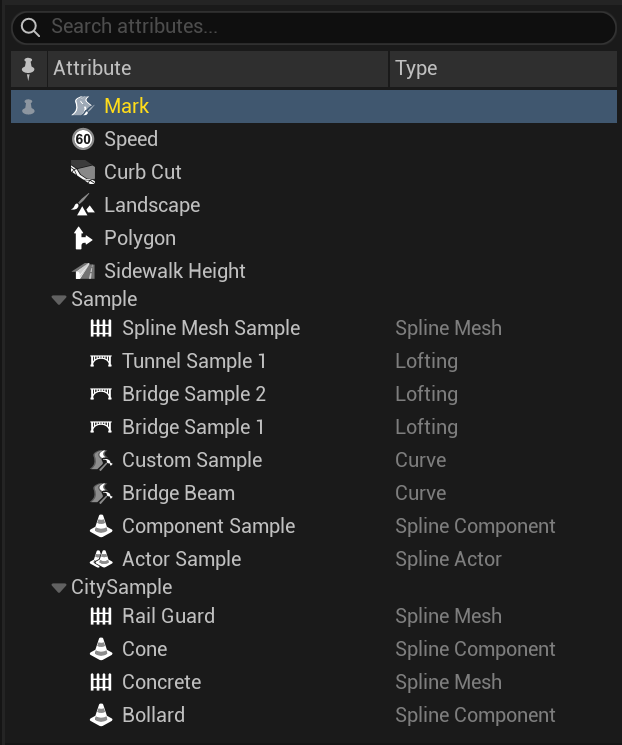
Attributes are built to be extended — a new type appears automatically in the Attribute tree and the build pipeline, with no edits to the core plugin (MetaRoad auto-discovers every attribute descriptor, native and Blueprint):
Attribute Profile assets register and pre-configure a type — see Attribute Profile.
Blueprint — subclass Generate and override
GenerateAsset()to emit any geometry along a lane (no C++ needed); the mesh pipeline builds it automatically.C++ — subclass
FRoadLaneAttributeValue+URoadLaneAttributeDescriptorfor a brand-new data type with its own evaluation and editor drawing. (To be documented in the upcoming C++ API section.)
Editing attributes
Add, pin, and key attributes on a lane in Attribute Mode — a searchable tree of every type, with a pin column that adds or removes a type on the selected lane(s):
See also
Attribute Mode — add and edit attributes in the editor.
The Road Model — how lanes (which carry attributes) fit into a road.