The MetaRoad Workflow
The mental model for MetaRoad, in three steps. Read this first — everything else in the docs is a detail of one of them.
Create → Edit → Bake
All road authoring happens in one editor mode, Meta Road (see The Meta Road Editor Mode), and always follows the same loop. It is iterative — you can step back from Bake or Edit at any time (dashed arrows):
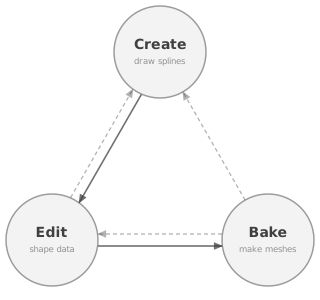
Create — lay down road geometry (splines). See below.
Edit — shape the road’s data model (lanes, sections, offset, width, attributes). See below.
Bake — generate the final meshes into a
_Genactor. See below.
While in Create/Edit you work in the Schematic view; flip to Preview any time for a live, non-destructive preview of the baked mesh — nothing is written to disk until you Bake.
Create: roads are connected splines
Everything on the road side is road splines (URoadSplineComponent) — a straight road, an intersection, a
roundabout, a bridge, or a whole interchange is just a set of splines. Splines must live on an AMetaRoad actor
(the pipeline ignores splines on other actors; the Create tools make the actor for you). Splines link end-to-end
through connections to form junctions and let lanes flow between roads — the Create tools wire these for you (full
model: Intersections and Junctions).
Three tools create splines:
Draw Spline Tool — the universal way; draw any spline and connect them by hand. Complex or non-standard interchanges are built here.
Intersection Tool (Pro) — a shortcut that generates and connects junction splines from road ends.
Roundabout Tool (Pro) — a shortcut for a circular road.
The Pro tools are just faster ways to produce ordinary splines — there is no special “intersection” or “roundabout” object underneath.
Edit: the road data model
Each spline owns a small data model — its lane layout along the spline, in the road’s local S-R-H frame (S = along the road, R = sideways, H = up): a reference line, lanes (width, type/zone, direction), lane sections (the layout can change along the road and may be asymmetric), a center-line offset, per-lane attributes, and endpoint connections. The baked mesh — and everything downstream (ZoneGraph, FBX) — is generated from this model, so understanding it is what lets you build correct networks. Full reference: The Road Model.
The Edit palette is where you edit it — one sub-mode per part:
Edit sub-mode |
Data-model part |
|---|---|
Reference line — nodes, tangents, arcs, endpoint connections |
|
Lanes and lane sections |
|
Center-line offset |
|
Per-lane width |
|
Lane attributes |
Bake: spline grouping
Baking turns your splines into meshes inside a generated _Gen actor (see Baking).
Important
A generation unit = AMetaRoad actor + SubGroup. That pair is the group MetaRoad bakes together into one
mesh. Splines in the same actor and the same SubGroup are fused into one seamless mesh; a different actor
or a different SubGroup produces a separate mesh.
Grouping decides the mesh. The lane graph — which lanes flow into which at a junction — is a separate thing, wired by connections.
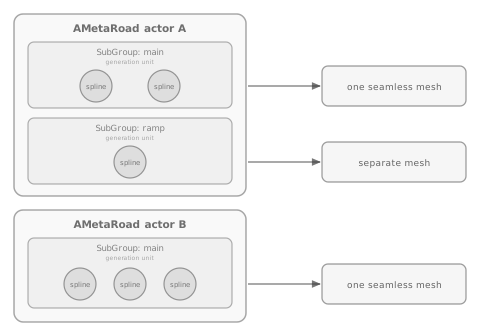
Keep a junction in one actor and sub-group so its surfaces stitch into one mesh (split across actors/sub-groups → seams).
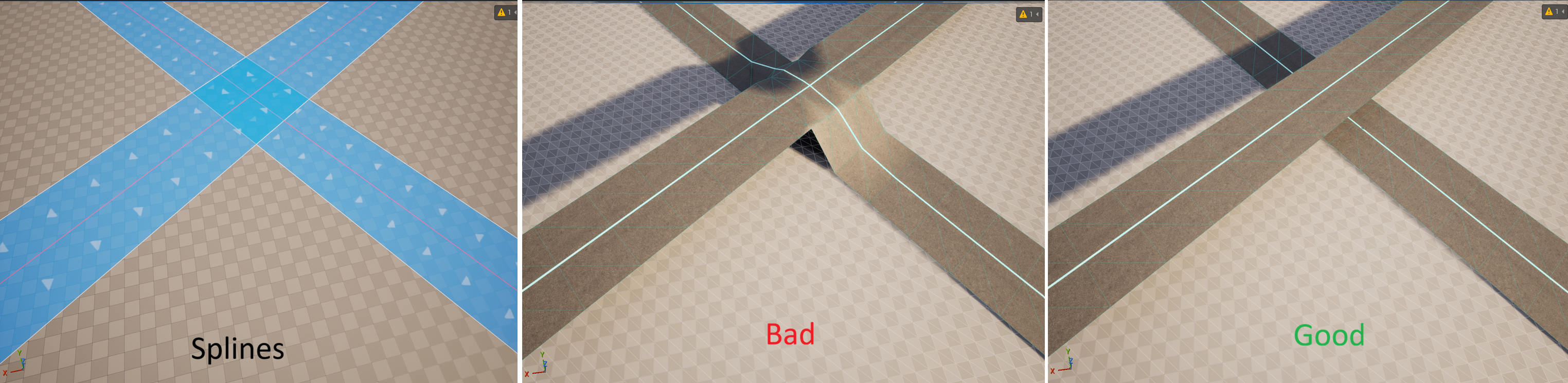
Split the levels of a grade-separated (multi-level) junction into different sub-groups or actors — the crossing roads sit at different heights and must not fuse into one surface.
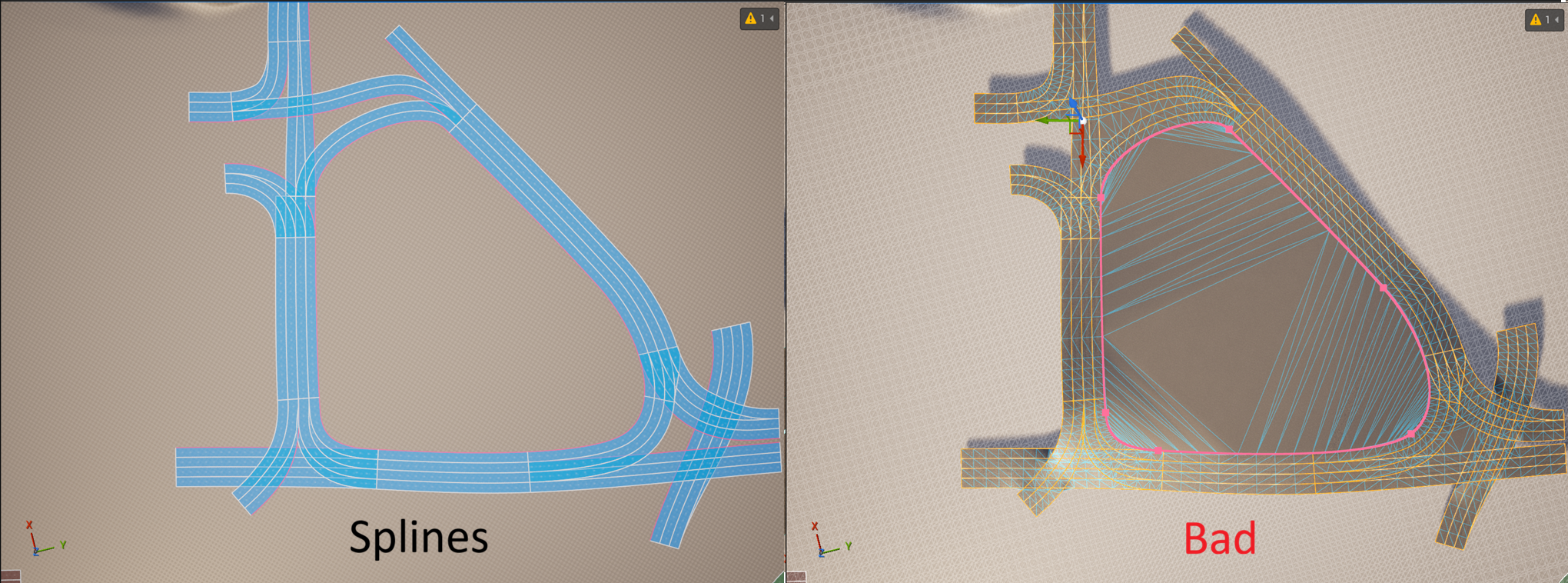
Don’t put too much in one sub-group — one unit becomes one static mesh; give each junction (plus its approaches) its own sub-group so Unreal can cull, LOD, and collide efficiently.
Examples:
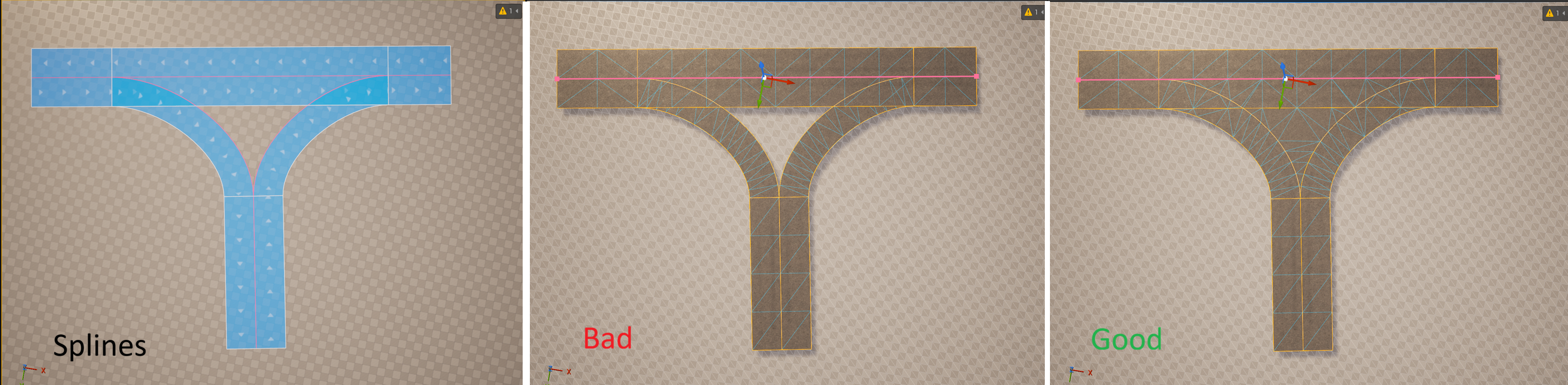
A flat T-junction (panels Splines → Bad → Good). Bad: the splines are split across sub-groups/actors, so the junction bakes in disconnected pieces with seams. Good: they share one actor + sub-group and bake as one seamless surface:
A multi-level crossing (panels Splines → Bad → Good). Bad: both roads share one actor + sub-group, so the crossing is wrongly fused into a distorted surface. Good: the levels are split into separate sub-groups/actors and each bakes cleanly:
And this is too much in one group (panels Splines → Bad): with every spline of a whole network in one actor + sub-group, the bake fuses the entire layout — even the area enclosed by the loop — into one big, poorly-controlled mesh. Don’t do this; give each junction (plus its approaches) its own sub-group:
Attributes and profiles
Attributes are the extensibility layer: a typed curve of keys placed along a lane (by arc-length SOffset) that
adds markings, guardrails, speed limits, landscape deformation, or your own custom data and geometry — new attribute
types plug into the pipeline automatically. See Attributes; you place them with the
Attribute sub-mode.
Profiles are reusable Content-Browser assets (road / mark / attribute / polygon shapes) you reference from roads and attributes — see Profiles. Presets are saved build settings that control how a road bakes — see Preset Mode.
Where to go next
New here? Do the Quick Start.
The data model in depth: The Road Model.
Output: Baking and FBX Export.